1、新买来的电脑win8系统发现打不开应用商店?教你如何解决。

2、win+R键或者右键“开始”-运行。

3、在弹出框输入:”services.msc“
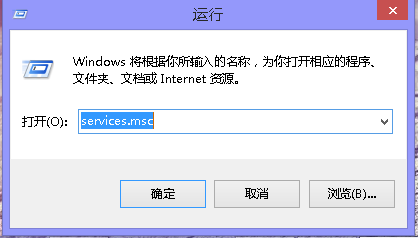
4、弹出框找到Windows store service (wsservice),启动此服务。

5、成功!快去愉快的下载吧

1、新买来的电脑win8系统发现打不开应用商店?教你如何解决。
2、win+R键或者右键“开始”-运行。
3、在弹出框输入:”services.msc“
4、弹出框找到Windows store service (wsservice),启动此服务。
5、成功!快去愉快的下载吧